TECH Signal 464
What happens if you put work into the second dimension?
 ↗
↗
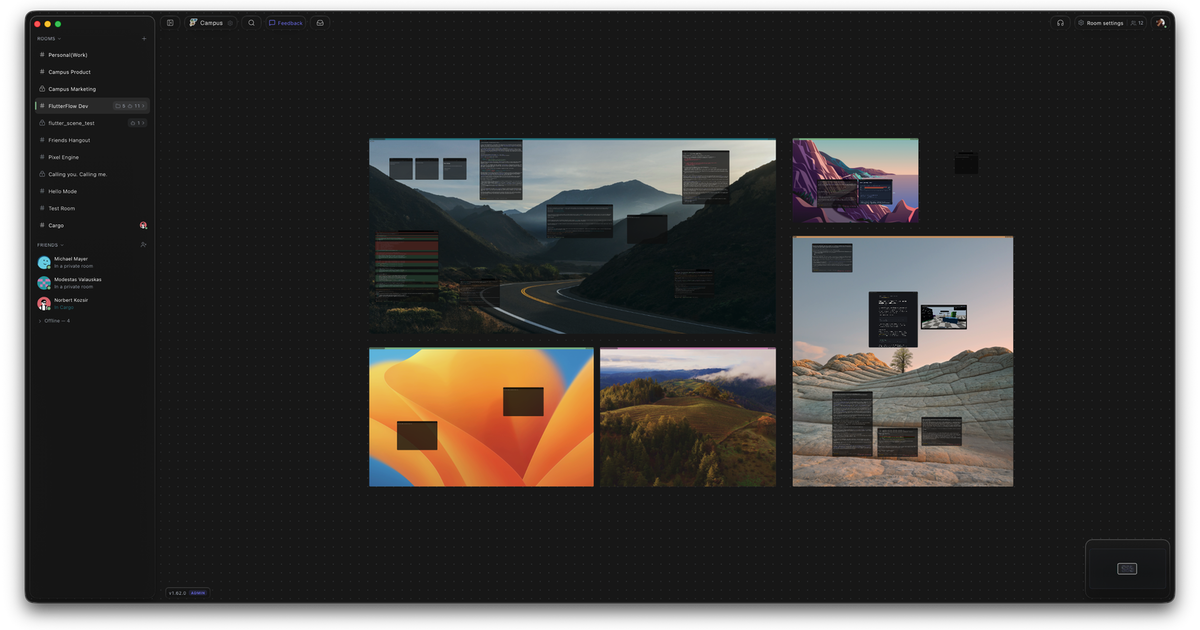
A new macOS tool, Campus, replaces tab-based workflows with a 2D spatial canvas for organizing running apps, terminals, and work artifacts side by side.
Engineers now juggle more parallel tasks, agents, tickets, terminals, browsers, than traditional tab bars can handle. Campus collapses these into a single visual plane, trading vertical scrolling for spatial memory. The trade-off is screen real estate; small displays may feel cluttered, while large ones gain persistent context.
Written by elseif from the cluster below · every claim links back to a sourceThe three things worth knowing
Campus embeds live terminals, browsers, and apps directly on an infinite 2D canvas instead of stacking them in tabs.
The tool targets the fatigue of context-switching between agents, IDEs, and issue trackers by grouping related work spatially.
Adoption requires re-learning navigation from linear tabs to a free-form canvas, with no clear fallback for users who prefer keyboard-driven workflows.
THE READ
What elseif makes of it.
The shift from tabs to a 2D canvas reflects a broader move from linear to spatial organization. Tabs enforce a strict order; Campus lets users arrange work by project, not by tool. This mirrors how physical desks hold documents, tools, and notes in proximity, but it demands more screen space and visual discipline. Engineers who rely on keyboard shortcuts to cycle tabs may find mouse-heavy spatial navigation slower until muscle memory adapts.
Campus treats context as a first-class citizen. Instead of scattering Jira tickets, Slack threads, and GitHub PRs across separate apps, it places them adjacent to the running code or agent output. This reduces the mental load of reconstructing state after a switch, but it also risks visual overload. The canvas can become a graveyard of stale artifacts if users don’t actively curate it, turning a productivity aid into a distraction.
The tool’s multiplayer roots reveal a secondary goal: reducing isolation in remote work. By sharing a canvas, teams can see each other’s terminals and browsers in real time, mimicking an office’s ambient awareness. However, this transparency comes at a cost. Private work, drafts, sensitive logs, or exploratory debugging, must be siloed off, adding a layer of friction. The plugin system may eventually let users toggle visibility, but for now, the canvas is either fully shared or fully solo.
Adoption hinges on whether the spatial model outweighs its quirks. Campus eliminates tab-switching but introduces new failure modes: accidental drags, overlapping windows, and the need to manually resize tiles. Unlike tabs, which auto-collapse when unused, the canvas requires active management. Engineers who thrive in minimalist environments may resist the visual noise, while those drowning in parallel tasks may accept it as the price of coherence.
Written by elseif from the cluster below · checked for specifics the sources never containedTHE CLUSTER